I Got Tired of Losing My PowerShell Scripts.
So I built this thing.
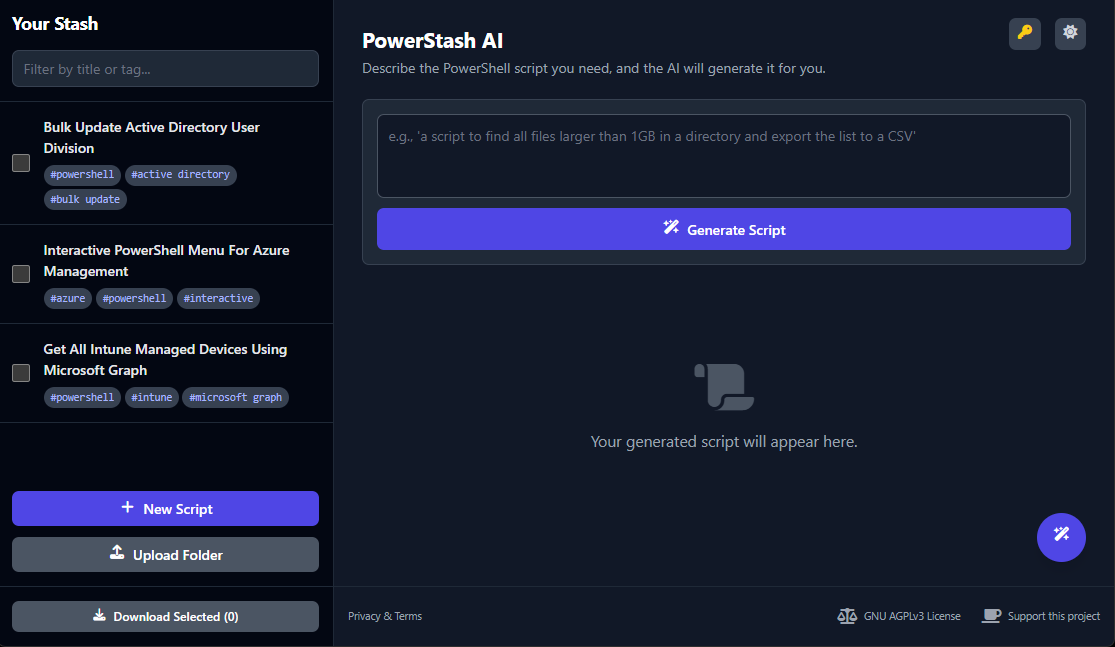
PowerStash is a simple, browser-based tool to stash your PowerShell scripts. Then I bolted on some Google Gemini AI magic to generate, edit, and automatically tag them. Maybe you'll find it useful too.
No sign-up. No nonsense. Just bring your own API key.
Important: A Quick Note on Security & Data
This is a 100% client-side app. Your scripts and API key are stored ONLY in your browser's local storage. I never see them, and there's no server to store them on.
However, when you use AI features (generate, edit, etc.), your script content is sent directly from your browser to the Google Gemini API.
Please DO NOT upload scripts containing secrets, passwords, or sensitive production data. Treat it like you would any public AI chatbot.
What This Thing Actually Does
My `C:\Users\Me\Scripts` folder was a dumpster fire. This is my attempt to fix that.
Generate Scripts from Ideas
Can't remember the syntax for `Invoke-RestMethod`? Just describe what you want in plain English. The AI will generate a script, title, and tags for you. It's surprisingly good.
Tame Your Script Hoard
Got a folder full of files named `fix-v3-final.ps1`? Point the app at it. The AI reads each file and tries its best to give it a sensible title and tags.
Edit with AI
Ask the AI to refactor a function, add error handling, or turn a command into a comment-based help block. It shows you a "diff" so you can see the changes.
Chat When You're Stuck
There's a built-in AI assistant. Ask it to explain a script, debug a weird error, or just brainstorm ideas. It's like a rubber duck that talks back.
Good to Know (a.k.a. FAQ)
Is this free?
Yes, the app is 100% free and open-source. However, you are responsible for any costs from the Google Gemini API. Google has a generous free tier which is probably more than enough for casual use. Check their pricing page for the official details.
How do I get a Google API Key?
Head over to Google AI Studio, sign in, and click "Get API key". The app will prompt you for it when you first load it up.
What are the supported models?
You can choose between the latest Gemini models, including Gemini 2.5 Pro (smarter, slower) and Gemini 2.5 Flash (faster, great for most tasks). You can switch between them anytime in the settings.